
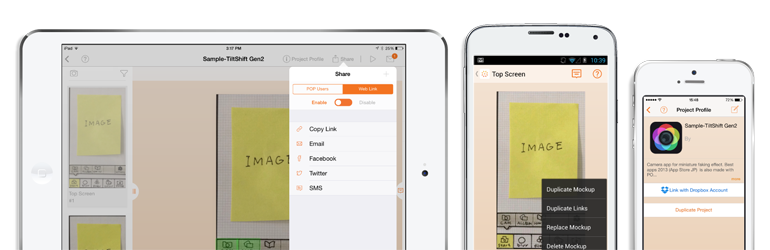
Presenting a mockup design for your clients is a great way of showcasing them your mobile applications and responsive designs. There are a lot of great resources and services available that help you do this.
In this article, I would like to share with you ten useful resources for creating mockups for mobile designs and mobile applications. Some of the resources are interactive mockup tools, and some of them are for static images, both are useful in different ways.
*Resources are listed in no particular order.
1. InVision App
InVision App is a design protocol tool that transforms static designs into clickable prototypes that support gestures, transitions and animations.
You load in your static mockups, then define which areas you want to be interactive, and what they should do. For example, make a menu item clickable, so that it transitions to another page.
Clients can click on any part of your design in order to communicate to you what they like and dislike. This feedback can then be transformed into a to-do list.
InVision App is free to use for one project. Three projects costs $15 per month and unlimited projects costs $25 per month.

2. Cool Mockups
Cool Mockups has a huge collection of free and premium mockup designs (although they only offer a couple of free designs). Designs are available individually or as collections.
These are Photoshop files that allow you to save a flat screenshot or image to a smart object layer, and it is automatically inserted into the 3D scene.
Prices start at only $5 for a single PSD file. Collections offer much better value. For example, you can purchase a collection of 29 Macbook and iPad mockups for only $11.
At this time, all mockup images feature iPhones, iPads, and Macbooks. Non-Apple devices are yet to be supported.

3. PSD Covers
PSD Covers has a good collection of PSD files that can be used to create mockup mobile designs, DVD cases, books, boxes, and more. It also boasts a large tutorial section that explains how you can create mockup designs. Use the tag cloud on the right column to find great mockup designs for mobile devices such as iPads and iPhones.
These are not .psd files, but Photoshop actions. You load the actions into Photoshop, then play the actions to create the base file, add your image, then create the 3D mockup.

4. Pixeden
Pixeden has a large collection of free and premium user interfaces and mobile app graphic kits. The majority of their resources are geared towards iPhones and iPads.
Their premium membership plan costs only $10 per month, $96 per year, or $72 per year if you opt-in to automatic renewal.

5. MockUPhone
MockUPhone provides a variety of devices for your mockups. Simply choose one, upload your file, and get your mockup.
The interesting thing about this site is that they have harder to find devices such as large TVs, Microsoft Surface, and a good variety of Android devices.

6. Mokk.me
Mokk.me is a free tool that allows you to create mobile app mockups for iPhone, Android, and WebOS. These mockups can be shared and tested on multiple platforms. The code for the HTML, UI CSS, and JavaScript, are provided for use in production.
The interface is very easy to use. All you have to do is drag and drop the fields and elements you want into the mobile interface. Everything can be moved around, configured, or deleted; whether it be text, images, forms, buttons, or maps.

7. NinjaMock
NinjaMock is a service that lets you create wireframe designs for iOS, Android, Windows, and browsers. Mockups can be saved in PDF format and emailed to clients.
The visual editor gives you all the controls you need for creating your mockup. A vector editor lets you create things by freehand. Colleagues and customers can also provide comments about your design via the editor.
The service is free for those of you who want to create three projects for non-commercial use. Unlimited projects costs $10 per month.

8. Fluid UI
Fluid UI helps you visualize the flow of your mobile app interface. It has a huge collection of 3,500 mobile, tablet, desktop, and wearable widgets. Mockups can be tested on iOS and Android and shared with clients.
The service is free to use for one project and ten pages. Their lite plan costs $12 per month and allows one project, an unlimited number of pages, and ten uploads.
Upgrading to the standard plan at $29 per month allows ten projects and unlimited projects and pages. It also offers additional tools such as project cloning, exports and printing. Their top plan costs $49 per month and has no restrictions on projects or pages.

9. POP App
POP App is a service that was designed to help you present, explain, and share your app ideas.
Mockups can be modified on any kind of device and it integrates perfectly with services such as DropBox.
Two projects and one member are permitted under their free plan. Their basic plan costs $10 per month if paid yearly and offers ten projects and three members. Upgrading to their pro plan at $25 per month allows unlimited projects and team members.

10. The Best Android Lollipop UI Design Kit
UXPin released a fantastic free Android UI kit modestly entitled “The Best Android Lollipop UI Design Kit“. With so many mockup services and tools focusing on Apple devices, it’s good to see a website offering resources for Android developers.
The kit contains 45 stylish Android Lollipop inspired elements that can be modified in Sketch, Photoshop, and UXPin. A Nexus 5 body, Nexus 6 body, and over 100 icons, are also included with the download file.

What Say You?
I hope you have enjoyed this list of tools and resources for creating mockups for mobile applications and designs. If so, I encourage you to follow AppPresser on Twitter.
Did we miss out a useful mockup tool that you use regularly? Please feel free to share any great resources we missed in the comment area below if we did so.
Thanks,
Kevin


7 responses to “10 Great Resources for Mocking Up a Mobile App”
Thanks for a great share. I’m using mokk.me to do a mockup for a client and my programmers.
Very good stuff
Hi , its really a nice post .Am really glad to say that i use android mockup templates in my phones.And i really enjoyed it.
Thanks for posting
inVision software was very good software, used to create app for graphic design company in pune
its very easy to use MockUPhone
Is there any free trial for Invision App
Nice list… Keep sharing.