
Turn on app features (Features)
Build Your App · AppPresser 文件
Turn on app features (Features)
本文尚未翻譯,因此以英文顯示。
Your app journey: step 3 of 9, Connect and set up. New here? Read Start here: build your app with AppPresser first.
What you'll do: Turn on the extras your app needs, like the camera or ads. This guide explains each feature, what it does and where to turn it on.
Before you start
- Your WordPress website is connected. See Connect your WordPress site and turn on Features.
- Decide which features you really use. Apple can reject an app that turns on things it doesn't use.
Turn a feature on or off
- In the left menu, under Configuration, click Features.
- Find the feature. Read the short text under its name.
- Click the switch on the right to turn it on or off. The change is not saved yet.
- Click Save Changes at the top of the list.
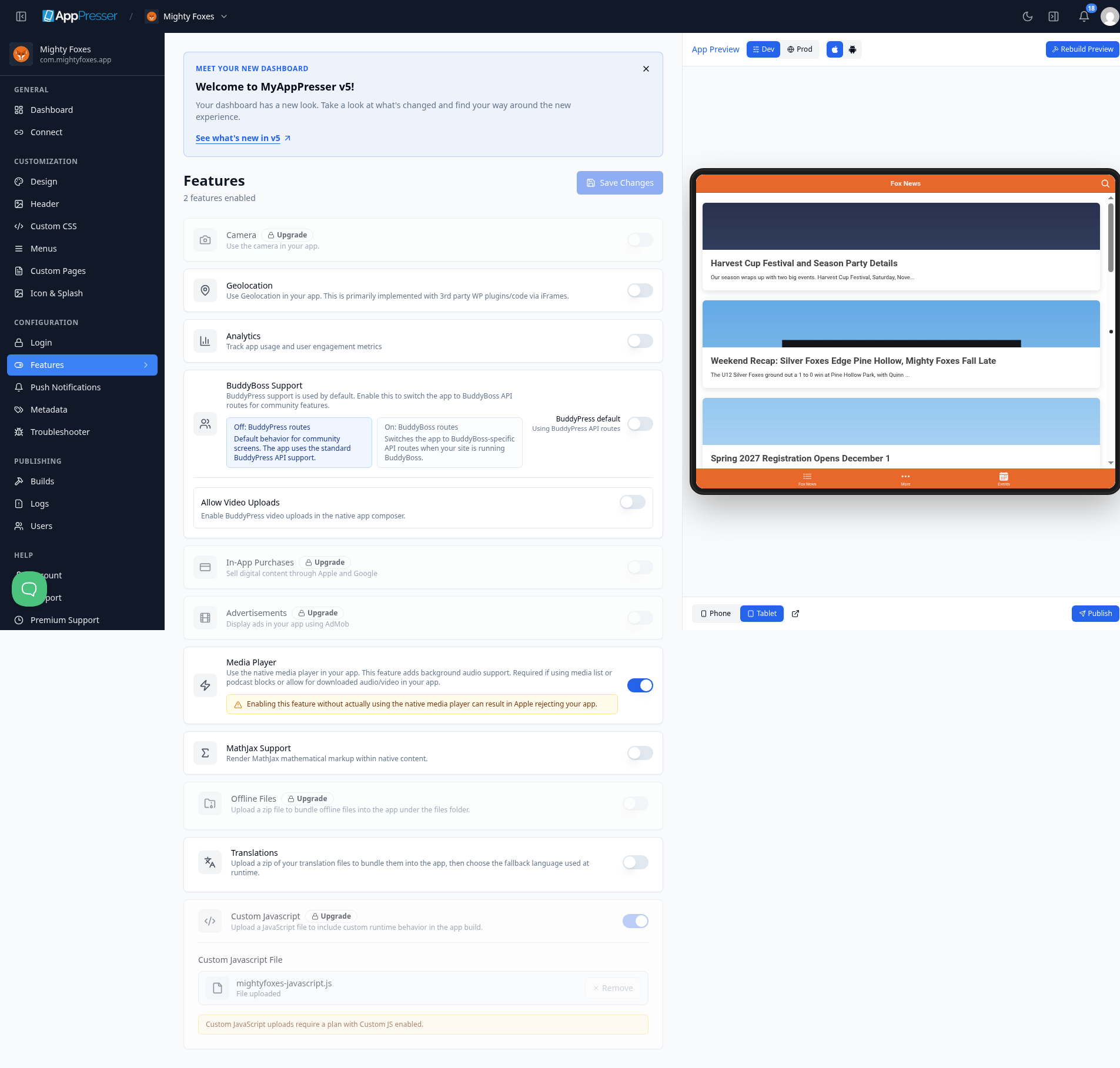
Tip: A feature with an Upgrade label isn't part of your plan. See Get your AppPresser account to compare plans.
After you change features, make a new build so the change reaches phones. See Build your iOS and Android apps (Builds tab).
The features
Swipe sideways to see the rest of this table.
| Feature | What it does (from the Features screen) | Where to turn it on | Plan and notes |
|---|---|---|---|
| Push Notifications | Sends messages that pop up on people's phones. | The Enable Push Notifications switch on the Push Notifications screen. It saves by itself. See Turn on push notifications and send a message. | Every plan. |
| Analytics | Track app usage and user engagement metrics. | Features screen | |
| Media Player | Use the native media player in your app. Adds background audio support. Required if you use media list or podcast blocks, or downloaded audio or video. | Features screen | Needed by the Show podcasts, audio and video (Podcasts/Media block). Turn it on only if you use it. Apple can reject your app if this is on and you don't use the media player. |
| Camera | Use the camera in your app. | Features screen | Needed by the Let people upload photos (App Camera block). |
| Geolocation | Use the phone's location in your app. This mostly works through other WordPress plugins shown inside your app. | Features screen | |
| BuddyBoss | Your app uses BuddyPress by default. Turn on BuddyBoss Support if your site runs BuddyBoss. Allow Video Uploads lets people upload BuddyPress videos from the app. | Features screen, under BuddyBoss Support | For the BuddyPress/Boss blocks, such as the Show your community activity feed (BuddyPress/Boss Activity block). |
| In-App Purchases | Sell digital content through Apple and Google. | Features screen | Advanced plan. Needed by the Sell in-app purchases (In App Purchase Form block). |
| Ads | Display ads in your app using AdMob, Google's ad service. Shown as Advertisements on the Features screen. | Features screen | Needed by the Let people choose personalized ads (Ad Settings block). |
| WooCommerce | Your online shop in your app: products, cart and account pages. | Nothing to switch on. The WooCommerce blocks work once your WordPress site runs WooCommerce. | Add the AppCommerce plugin to your site. See the Show your products (WooCommerce Products block). |
| Custom JS | Upload a JavaScript file (code that adds your own behavior) to include in the app build. Shown as Custom Javascript on the Features screen. | Features screen. Upload your file under Custom Javascript File. | Needs a plan that includes Custom JS. |
| Offline Files | Upload a zip file to bundle files into the app, in its files folder, so they work without the internet. | Features screen | |
| Translations | Upload a zip of your translation files to bundle them into the app. Then choose the fallback language, the language used when no other one fits. | Features screen | Needed by the Let people choose a language (Language Settings block). |
| MathJax Support | Show math formulas written in MathJax inside your app. | Features screen |
See which features are on
Your app's Dashboard shows a tile for each feature, so you can see at a glance which ones are on.
You're done when the features you need are on and Save Changes is gray again.
Next step
Choose your app colors and fonts (Design)
Related articles
這篇文章對您有幫助嗎?
輸入時結果會即時更新。按斜槓鍵(/)可跳轉到搜尋。
沒有找到?
我們的支援團隊可協助解決設定、建置和應用程式商店相關問題。