
One of the biggest pain points of app development is getting your app onto a device for testing.
Android is not too bad, but iOS requires a lot of jumping through hoops. To help make this easier, we have created a new preview app for AppPresser 3 that allows you to view your apps on a device instantly. No PhoneGap account or iOS certificates required, just enter your information and start testing immediately.
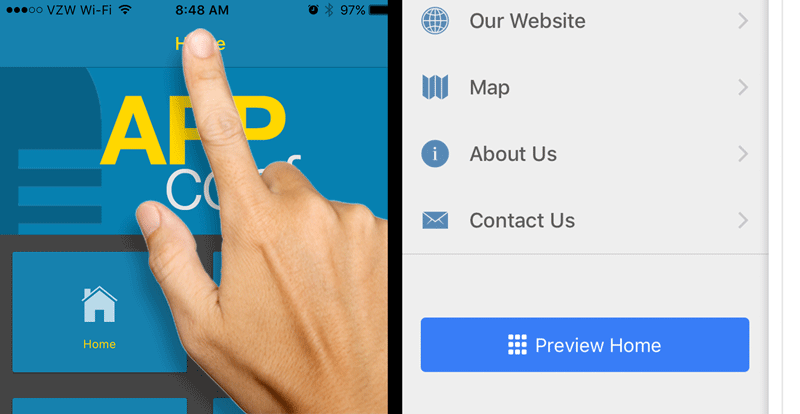
Here is what the app looks like:

How to Use the Preview App
After downloading the app (download links below), enter your myapppresser.com site slug, username, and password. You can find your site slug at the end of the url you use to access your account:

You can also find it by clicking on one of your apps, then going to the “General” tab.
After logging in, you will see a list of your apps. Click “Load App” to download and display your app.
Getting Back to the Preview Home Screen
To get back to the preview home screen to switch apps, use a 3-finger tap on the header or side menu. (It also works anywhere on custom pages)

On the preview home screen you can load a new app, or remove app files from your device (this will not remove your app permanently, just the downloaded files). Click the login icon in the toolbar to switch accounts or login again if necessary.
What does and does not work in the preview app?
Most features work, but please build your own app with PhoneGap Build for final testing, or if something doesn’t look right. Push notifications do not work in the preview app.
Download the app
To being using the preview app, download from the app stores:


9 responses to “All New AppPresser 3 Preview App”
I just try the preview app, very helpful tools! Especially for ios testing.
However, i noticed that if i use offline assets such as logo, it doesn’t show up on the preview app :p
Keep rocking guys!
Hmm, offline assets should be working, please send a support ticket. Thanks.
Hi guys,
Awesome!!
I just about managed to get my test app on an iphone yesterday and it was quite a nightmare with the certificates etc. Got it done in the end but your preview app is really good news. Looking forward to testing it out.
Cheers!
This app was working beautifully for me initially, but lately I get the following on all pages:
Webpage not available
The webpage at file:///android_asset/www/null
could not be loaded because:
net::ERR_FILE_NOT_FOUND
However, everything displays as designed within the myapppresser dashboard. What could the problem be?
Hi this issue is fixed, please rebuild your app. If you are using the preview app, update to the latest version.
Thanks!
The previous version of the preview app didn’t require a login which facilitated the preview process by third parties without having to provide AppPresser credentials. Is there a setting do the same with this one?
The preview app has always asked for a login, it is required by Apple to be in the app store.
AppPresser is really a very useful app. Thank you so much for developing it.
AppPresser is very awesome app. thanks to app developer