

Update 10/5/20: we made some improvements to podcasting in AppPresser apps, check out this post
By the end of today’s video you will understand how to get your podcast setup in AppPresser so that your users can listen to your podcasts. They’ll even be able to download it for offline listening.Here are the basic steps:
- Install and setup Blubrry
- Have some media setup for your podcasts
- Go to AppPresser -> Settings and choose your media post types and click save- Grab the URL to your source media file
- Add that source media URL to the AppPresser media URL and then save your post (you can also do this programatically)
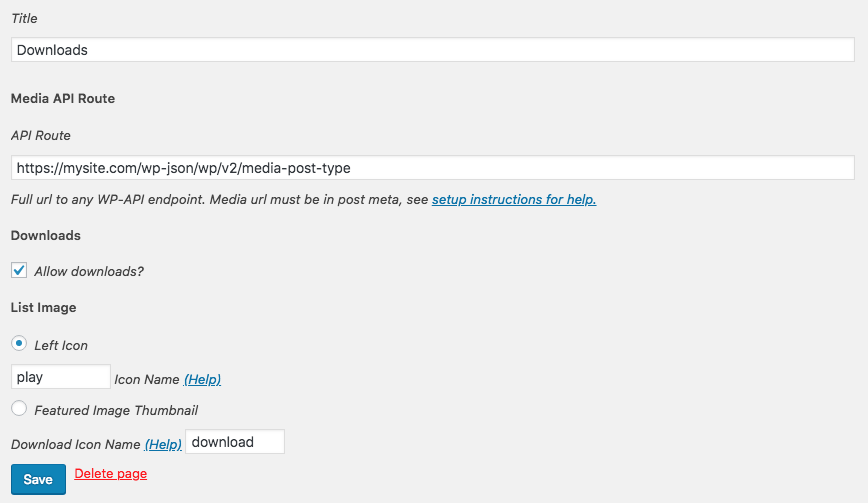
- Go to your app and create a new custom page using Media Downloads as the type- Add the API route for your post type you’re using with podcasts
- If you’re using a category you’ll need to include the category_id from the URL when you edit a category
- If you need more help check out documentation
That’s the main setup of your podcast. Now you can choose your icon, whether you want your users to be able to download the episodes. As you see in the video, Scott shows you how to do some visual customization of your app to make it lookIf you don’t want to copy and paste all the media urls to the proper AppPresser field then you can use the code below to make sure that your media is added to the right spot.
Remember this may need some customization and you should remove it after it’s one time use. You can find a bit more information on podcasting by going to our documentation.
To make your podcasts downloadable, just check “Allow Downloads” when you setup your media list.




8 responses to “Downloadable Podcasts in Your AppPresser App”
I Have a question:
Will AppPresser keep playing in background when the user goes to another app or lock the screen?
Yup you can do that. See this part of our documentation. https://docs.apppresser.com/article/387-offline-assets-images-and-media-that-work-offline
Thank you for this video! Sadly two very important features for podcasting are still missing with this method of podcast-integration:
– using an rss feed for gathering the data (audio, cover and shownotes). This is standard for podcasting.
– displaying shownotes. Ideally, you would have a page for each episode with shownotes, integrated player and a download-button… Like on the left top picture on this page.
A real podcast integration could be a killer feature! 🙂 All the best
Max
I brought this to the attention of the team and we’ve added it to our internal Trello board for features. No ETA or promise, but it’s now at least on a list so we can keep track of it.
any news on this? without RSS feed this is useless
Hi, this uses the WP-API, which is the new and improved version of RSS. Is there a reason you need RSS?
now I can reply to this. RSS has no problem when showing the podcast image.
I’ve been trying to tell your team the WP featured image does not show on my apps and I got this as reply: “I can understand your frustration at the issue but an image isn’t really that important for an audio podcast. The improper placed or even missing image doesn’t prevent a user from listening to the podcast.
As such, this issue is a lower priority for us…”
what you don’t seem to get is that an image is PART of the podcast, and it makes a difference when you show it (or not).
Hi, we just released a big update to our media player. It handles images pretty well, we are open to suggestions via email if you know how we can improve it: https://apppresser.com/new-media-player-and-more/
Thanks!